One day you're brawling over beers, the next you're defending the Realm against a clockwork assassin! If you want to come out on top - whether for glory or your life - you'd best learn to fight...
MCombat is the primary combat system used for Castle Marrach, and the only combat system that encorporates use of magic, archery, and CNPC opponents. A turn based combat system, MCombat revolves around the well timed use of buff and debuff skills known as "active abilities", combined with a series of three basic attack abilities used each turn known as an "attack sequence".
Preparing to fight
Before starting combat, you must first signal to the game that you are ready to enter battle. The primary command used to govern MCombat actions is the @mcombat command (or @mc for short), followed by a parameter in quotations specifying what you wish MCombat to do.
- @mcombat 'ready
Readies your character for MCombat; he or she will join the next MCombat fight that commences in this room.
- @mcombat 'unready
Unready your MCombat ready status so that you are no longer pulled into the next fight.
Additional rules can be set to alter the settings of the match before it begins:
- @mcombat 'fighteasy (#)
This setting allows your character to 'hold back' in battle, making the match more even between unevenly matched opponents. The number you set for fighteasy represents the amount by which ALL of your combat skills are lowered for that match, so even setting this to 1 or 2 makes a significant impact on your fighting ability. This setting remains in effect even after the conclusion of your fight, until un-set using @mcombat 'fighteasy disable.
For a breakdown of combat skills and their effects, see
combat skills.
- @team '(teamname)
This command specifices that you wish to fight on behalf of a certain team of fighters during multi-opponent combat. Team names can be any string (word) and are not case sensitive. Note that in fights against CNPCs, your team is always set to "players" regardless of your preferences.
- @area '(direction)
This command specifies to MCombat which 'fighting area' you wish your character to start the match in. By default this set as the 'center of the room' and is generally only altered if there are ranged combatants who wish to start off the fight away from potential attacks.
Starting or joining the fight
Once all desired combatants in the room have readied for combat, anyone in the room may initiate the start of a new match. The rules of that match will be determined by the type of match initiated:
- @mcombat 'practice
Initiate a practice match where individuals are removed from combat as soon as they are struck. Fatigue is fully restored for a practice match, but is reset to pre-practice match values after the fight.
- @mcombat 'duel
Initiate a duel match where an individual is not removed from battle until they receive their first wound. Fatigue is not restored before a duel, so make sure you're properly rested first.
- @mcombat 'fight
Initiate a fight to the death where a combatant remains in MCombat until they die or withdraw (make sure you're not using rebated weapons for this!) Fatigue is not restored beforehand. Note that most CNPC enemies will only join this type of MCombat battle, and will ignore duels or practice matches that commence in their environment.
- @mcombat 'join
If one of the three battle types are already taking place, you may use this to immediately join an MCombat fight already in progress.
The attack sequence
The basic form of attack in MCombat is known as the attack sequence. This is a series of three standard attacks your character is permitted to perform every turn. At the start of your turn, a "hand" of 5 different available attacks is randomly drawn from your "deck" of available attacks, which is determined by the weapon(s) you have equipped. The @hand command may be used to view your currently drawn attack cards, and the @attack command may be used to select 3 of those 5 available attacks to perform against your opponent (discarding the other 2).
There are three different types of attack that can be drawn into your attack hand, each of the three types of attack has a different bonus effect, and the potency of that bonus effect varies depending on the whether it is the first, second or third attack in your sequence.
Quick attacks
Rapidly strike at the enemy, seeking a lucky opening in the opponent's defenses.
- Quick attacks generate 'critical points' when attacking an enemy. At the start of your next turn, those critical points are automatically consumed to increase the critical hit chance of your basic attacks. An attack that successfully crits will deal +50% damage and generate double critical points and focus points.
- First attack bonus: If the first attack in your sequence is a quick attack, all following attacks will also generate critical points even if they are not quick attacks - if they ARE quick attacks, they will generate bonus critical points.
- Third attack bonus: If the third attack in your attack sequence is a quick attack, it will generate 50% more critical points than a standard quick attack.
- Flush bonus: If all three attacks are quick attacks, a bonus chunk of critical points is gained at the start of your attack sequence.
Precise attacks
Carefully strike at the enemy, using methodically planned attacks to open your target's defenses and deliver a deadly Focus Attack.
- Precise attacks generate focus points every time they are used. After obtaining 100 focus points the character can use a 4th attack type called a Focus Attack, these are extremely damaging attacks that also have secondary effects. The Focus Attack used is determined by a character's equipped weapon(s).
- First attack bonus: If the first attack in your sequence is a precise attack, all following attacks will also generate focus points even if they are not precise attacks - if they ARE precise attacks, they will generate bonus focus points.
- Third attack bonus: If the third attack in your attack sequence is a precise attack, it will generate 50% more focus points than a standard precise attack.
- Flush bonus: If all three attacks are precise attacks, a bonus chunk of focus points is gained at the start of your attack sequence.
Strong attacks
Attack an enemy with a forceful swing of your weapon, tiring them faster or wounding them deeper.
- Strong attacks receive a bonus to their base damage, thus dealing more fatigue or health damage to a target per attack.
- First attack bonus: If the first attack in your sequence is a strong attack, all following attacks will also deal extra damage even if they are not strong attacks - if they ARE strong attacks, those damage bonuses will stack for even more damage.
- Third attack bonus: If the third attack in your attack sequence is a strong attack, it will gain a higher damage bonus than a standard strong attack.
- Flush bonus: If all three attacks are strong attacks, an additional damage bonus is granted to all three attacks which stacks with their existing damage bonuses.
- Synergies: Strong attacks receive a lessened synergy from quick and precise attacks. That is to say, if the very first attack is a quick or precise attack, strong attacks which follow will not receive as many bonus critical points or focus points as follow-up quick or precise attacks do.
All weapons in MCombat deal the same base damage, from a dagger to a spear to an axe. The only variances between weapon types comes in the form of the attacks they add to your attack deck, the Focus Attack they make available, and the active abilities they grant you.
As covered earlier, every new turn, 5 attacks are randomly drawn from your attack deck, 3 of which can be used to perform your attack sequence while the remaining 2 are discarded. The deck in its entirety consists of 15 cards, and the entire deck is therefore reshuffled every 3 turns when all 15 cards have been drawn. Of the 15 attacks this attack deck is comprised of, 10 of those are determined by the weapon(s) you have wielded; 5 for the right handed weapon and 5 for the left handed weapon. The remaining 5 are then determined by your MCombat fighting @style.
By understanding the cards added by every weapon and style, it is possible to set your deck in a desired manner. For example, if you wish to focus on critical strikes, you could pair a quick oriented weapon with a quick oriented style to ensure lots of quick cards are in your deck to draw from.
You can see the cards of any weapon in-game by using inspect [weapon].
Sorcerers use the same @attack command for their attacks as regular characters do. By default the spell used to attack with is the inherent sorcery 'willburst' ability, this is calculated in the same manner as an unarmed melee attack is - that is to say, it receives a significant damage penalty and cannot inflict an actual wound, it can only deal fatigue damage. If you possess an offensive wound capable sorcery spell, you can replace willburst with that spell by empowering your focus with the proper command. Presently there are at least nine existing sorcery spells that can be 'attached' to your basic attack cards to use in place of willburst - a strong, quick and precise spell for each of the schools of palai, fortis and communis.
Bold attacks
All basic attacks in a character's deck receive an attack suffix. For most weapon based combat, these suffixes are one of either "left", "right" or "high"; though ranged weapons and magic receive differently named suffixes their purpose is the same: execution of bold attacks. If all three of a character's attacks in an attack sequence have a matching suffix, they automatically will deal a fourth attack for free at the end of their attack sequence, called a bold attack. There are three forms of bold attack:
- Standard bold attack: All three attacks have matching suffixes. A fourth free attack is generated dealing basic weapon damage.
- Strong bold attack: All three attacks have matching suffixes and are also "strong" attack types. A fourth free attack is generated dealing the damage of a strong attack. Additionally, this attack type is registered as a strong attack type instead of a bold, granting it the benefits of any buffs you have that affect strong attack cards.
- Masterful bold attack: All three attacks have matching suffixes, and one of each attack type is used (quick, strong, precise). A fourth free attack is generated which bears a significant bonus to its damage.
Focus Attacks have a special parameter that allows them to act as a wildcard when generating bold attacks. A Focus Attack used in an attack sequence counts as 'every suffix', which means that combining a Focus Attack with any two attacks that have a matching suffix will generate a bold attack.
Critical points
As outlined earlier, critical points are gained for using quick attacks, or using precise/strong attacks after using a quick attack as the first attack in an attack sequence. After gaining critical points, those points are automatically consumed to give the basic attacks on your next turn a chance to critically strike.
Every 1 critical point you gain during an attack sequence will increase the attack chance of a random attack card in your next hand by 10% (meaning theoretically, at 50 criticals, all 5 attacks would have a 100% crit chance). The chance to land a critical hit is shown next to an attack card in carets (< >).
A critical hit increases an attack's damage by 50%, and doubles the focus points and critical points that attack generates if it generates any to begin with.
Focus points and Focus Attacks
As outlined earlier, focus points are generated by using precise attacks or by using strong/quick attacks after using a precise attack as the first attack in an attack sequence. Focus points can also be granted by using certain active abilities. When a character reaches 100 focus points, they can use a powerful Focus Attack. The Focus Attack available depends on a character's equipped weapon(s).
Focus attacks exist as a 6th attack opportunity (in addition to the 5 attacks in your @hand) that is always present as an option so long as focus is full. A focus attack will use up one of the three available attacks in that attack sequence and also counts as its attack type for your attack sequence's opening attack (e.g., a focus attack that is also a quick attack will generate the critical point bonus for the rest of the sequence if used as the first attack, etc). While focus attacks can grant the 'first attack bonus' for the rest of the attacks in their sequence, they do not benefit from said bonus if a different attack is used prior to a focus attack in that sequence.
Focus points may be used for more than just Focus Attacks: they can also be used to dodge certain attacks or interrupt others, though this can generally only be done to certain abilities used by CNPCs and not other players.
Active abilities
If one half of MCombat revolves around the attack sequence, the other half revolves around active abilities.
In addition to the basic attack types of quick, strong and precise, characters have up to 3 active abilities available to them based on their currently equipped weapon(s) and associated weapon skills. These abilities, all of which have cooldowns, are used outside of the attack sequence and thus do not use up one of your 3 attacks for that turn. Active abilities do not deal damage, and instead revolve around addition and removal of buffs and debuffs, focus points, critical points and other elements which affect the outcome of battle. Active abilities can only be used during your turn, at the start of your turn before attacking.
The three active abilities you are granted are dependent on what hand your weapon is equipped in, with the first 2 abilities dependent on the main hand and the last ability dependent on the off hand. For example, using a dagger in the main hand will grant the abilities 'Rapid Jab' and 'Evasion', while using that same dagger the off hand will instead grant 'Debilitating Strike'. Two handed weapons grant all 3 abilities, unless it is a hand-and-halfer being used with an offhand weapon or shield, in which case the two-hander's ability #3 is replaced by the ability #3 of your offhand weapon or shield.
Active abilities for sorcerers are determined by their learned sorcery spells instead of their weapons. This means it is potentially possible for a sorcerer to have dozens of active abilities to choose from, compared to other fighters who only have 3 at any given time. This adds versatility and allows sorcerers to fit into their intended role as support characters, with a wide variety of buff and debuff abilities to choose from. Despite this versatility, a sorcerer may still only have 3 abilities on cooldown at any given time; if 3 abilities are recharging, a 4th cannot be used even if that ability is not on cooldown.
Stance
The @stance command is a toggle to swap between offensive (regular) and defensive stance. Switching into a defensive stance will alter the @abilities of some weapons to be more defensive oriented, and sometimes increase your passive defense while lowering your attack. It is not recommended for use in 1v1 combat. Your @stance cannot be toggled while already in combat.
Combat styles
Your cards and activity abilities can be further refined to you or your character's preference through the use of combat styles. Some bolster things such as critical damage, while others can lower the cooldown of your abilities. However each carries its own set of cards for your attack sequence, that synergize with different weapons.
You can view and select your combat style with the following commands:
- @style 'list
Provides a list of all learned styles and the cards they will add to your deck.
- @style '(name)
Selects that combat style for all future instances of combat, until another is selected.
- @style 'default
Clears the currently selected style, reverting the combat style to 'default'.
Your character can only learn new combat styles by studying special manuscripts - but beware, some of these and therefore their combat styles can be rare!
Your combat style cannot be changed once combat begins, so be sure to review it when preparing.
Ranged combat
MCombat includes support for ranged combat, both using ranged weapons and using magic.
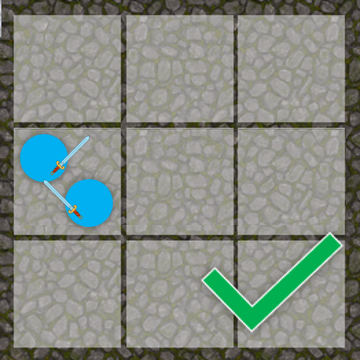
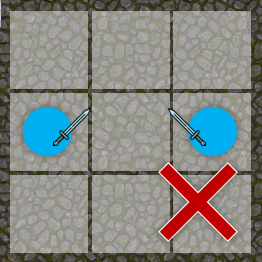
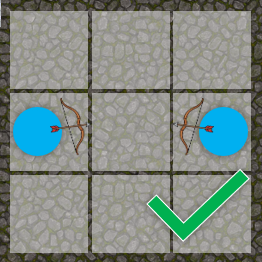
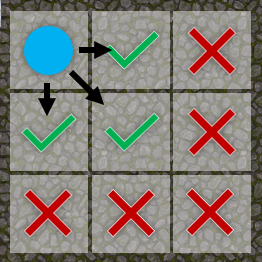
Before starting a battle in MCombat, a character can choose what 'fighting area' to begin the battle in using the @area command. Fighting areas are 9 fictional regions of the room, used by MCombat to determine where people are. These 9 regions are "the center fighting area", which is the default area all combatants start in if none is specified, followed by 8 directional areas that surround it. Think of the combat arena as a 3x3 grid of 'fighting areas'. Two characters in separate fighting areas cannot use basic / close range weapon attacks on each other, only archery weapons and sorcery attacks can hit an individual in another fighting area.
The @advance command can be used, only on your character's turn, to move to a new fighting area. The new area must be "adjacent" to the one you're in (so you cannot move from the north fighting area to the south fighting area in one go, you have to move to the center first).
Moving your area costs 2 of the 3 attacks in your attack sequence, meaning you can only use a single attack on a character after moving areas. Moving through an area triggers a 'pursuit attack' by any hostile characters in the same fighting area as you who have attacked you as their most recent target; a pursuit attack is a single high damage swing at your character as they attempt to retreat from that fighting area.
Ending combat
Combat will automatically end once the conditions for ending the fight are met, based on the type of combat initiated.
All characters have a quantified level of 'fatigue', comparable to what other games might call hitpoints. However, in most games where hitting zero hitpoints means death, reaching zero fatigue in MCombat means your character will sustain an injury (or not, at least take the hit if they are only practising.)
You can see all participants in a fight, their level of fatigue, team and combat style by using @combatants.
However, if things aren't looking so great(!), it is possible to end or leave the fight early:
- @mcombat 'withdraw
Withdraw from an MCombat fight. If this is not a practice battle, you can only do this during your MCombat turn, and any opponents currently targeting you will get a free 'pursuit attack' on you as you attempt to disengage from battle.
Sorcerers have exceptionally low fatigue due to the penalties inflicted during the binding, but receive combat willpower based on their sorcery skill level and out-of-combat sorcery willpower. Combat willpower can (and should) be used to defend against attacks in place of fatigue, by activating a defensive spell which will trigger to defend your characters from attacks via magic instead of through physical means. In order to do this, one such spell must first have been learned by your sorcerer character, and then must be activated by switching to that spell's corresponding @style. There are at least three existing sorcery spells that can be learned to defend yourself from attacks in MCombat at the cost of willpower instead of fatigue, one each for the schools of palai, fortis and communis.