The labrynthine corridors of Castle Marrach twist and turn - take care to pay attention to where you are and where you're going, for you never know what might be lurking around the next corner...
On this page, you will learn more about how to move your character in and between rooms, the proximity system and how it is used to track the locations of characters and objects.
Finding exits
The quickest and easiest way to find all exits in a room is to type exits. You'll be shown a list of all exists and how to use them. For example:
> exits
You may leave through the north door(north).
This works for exits your character can see.. but what about those they can't? The Castle is rife with secret doors and passages, but these you'll need to remember on your own as they won't be shown on the exits list.
Alternatively, you may see the exits listed in the room description. If using the Castle Marrach game client, the relevant directions on the mini-map will also appear in blue if they are viable exits.
Moving between rooms
To use the exit, the easiest option is type the direction of the exit using the cardinal (North, East, South and West) or ordinal (Northeast, Southeast, Southwest and Northwest) direction.
> north
You approach the north door.
You begin to enter the north door.
Shorthand works, meaning n will be interpreted as north, ne as northeast, etc.
Some exits may require you to enter them instead, where they are not in a specific direction (e.g., a portal floating in the middle of a room). Look for the instruction in brackets in the exits list.
Sometimes you may want to look before you leap - so using look (exit name) will often allow you to see into the next room without moving into it.
When moving through an exit, other characters in the room your character has left will see...
Kaira leaves through the north door.
... and characters in the room your character has entered will see...
Kaira arrives through the south door.
But what if you want to convey how your character is moving through the exit? You can still use movement verbs and adverbs (e.g., walk, run, skip, etc.) to move through the exit. For example, if you march angrily through the door, while you will not see this written out, other characters in the room your character has left will see...
Kaira marches angrily out through the north door.
... and characters in the room your character has entered will see...
Kaira marches angrily in through the south door.
Moving within a room (proximity)
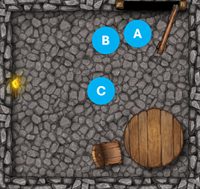
"Proximity", or "proxy" as it's sometimes called, just means “what is this character or object near” and is a helpful way to picture how a room is laid out. For example, in this scenario:
- Character A is standing near the north door.
- Character B is standing near Character A.
- Character C is standing in the center of the room.
- The torch is on the the west wall.
- The table is in the southeast corner.
- The chair is near the table.
You'll see a summary of all character, NPC and object locations whenever you enter, look at or examine a room. For example, if your character walked into the room pictured above through the north door, you would see:
A small stone room.
You and Character A are standing near the north door. Character B is standing near Character A. Character C is standing in the center of the room. A burning torch is hanging on the west wall. A wooden table is standing in the southeast corner. A wobbly chair is standing near a wooden table.
The exact wording (e.g., near, next to, standing, sitting, etc.) will be based on the character or object's pose.
Note that not all objects will be listed. Some objects form part of the 'background' of the room and will be listed only in its description, e.g., the floor, walls, windows, etc. You can however still interact with these objects.
Using the @people command will also provide a quick recap of all character locations.
> @people
You see the following characters present:
(Your character) is standing near the north door.
Character A is standing near the north door.
Character B is standing near Character A.
Character C is standing in the middle of the room.
By default, when entering a room, your character will be stood "near" the entrance they used. To change where your character is stood, use any movement (walk, run, etc.) or stance (sit, kneel, etc.) verb in conjunction with your intended target.
> run to chair
You move from the north door to a wobbly chair.
You run to a wobbly chair.
If you try to interact with a character or object in a way that would require your character to be close by (e.g., touching an item, whispering to someone, handing someone an item, etc.), your character will automatically move into proximity first.
> touch torch
You move from a wobbly chair to a burning torch.
You touch a burning torch.
Note that entering the proximity of another player's character requires the player's consent.
Finally, what if you don't want your character to be standing near anything at all? Use leave to move your character out of their current proximity and to simply stand “near” the room.
> leave
You move away from a burning torch.
You move to a small stone room.
Poses and prepositions
By default, characters will always be "standing near" another character, an object, or a part of the room. However, you can usually use different prepositions to better describe your character's position. For example,
- behind a desk
- on a chair
- in front of a door
- next to another character
To appear in this kind of position, just use the relevant preposition in your action. For example, if you stand behind chair, your position would become:
You are standing behind a wobbly chair.
Similarly, your character doesn't just have to stand. Verbs that describe your character's pose (e.g., sit, kneel, crouch, lie etc.) will replace "standing" and be displayed to others in the room. For example, if you sit on chair, your pose would become:
You are sitting on a wobbly chair.